Meta ads
If you can't trace a sale back to an ad, you're guessing
Most businesses running paid ads cannot answer one question: which ad produced the money. Without a working conversion tracking setup, every decision to scale, pause or rewrite is a guess dressed as a strategy. Here is the setup that gives you the answer.

This is what a broken conversion tracking setup actually costs someone. A client came to us spending about ₹3 lakh a month across Meta and Google. Their reporting said the campaigns were producing leads at a reasonable cost. Their bank account said revenue had been flat for two quarters. Both were true. The leads were real and the revenue was real, and there was no connection between the two reports because nothing linked a closed deal back to the ad that started it.
They had been scaling the campaigns with the lowest cost per lead for months. When we finally connected the two ends, those campaigns turned out to be producing the leads that closed least often. They had been putting more money behind their worst performers, confidently, using a number that looked like data.
Why attribution broke
If your tracking feels less reliable than it used to, that is not your imagination. Three things changed and they compound.
Browser and OS privacy changes
Apple's App Tracking Transparency, Safari's limits on cookie lifetime and Chrome's ongoing changes all reduce how long and how reliably a browser-based pixel can remember a visitor. A person who clicks an ad today and buys in three weeks may no longer be connected to that click at all.
Consent requirements
In the EU and increasingly elsewhere, non-essential tracking needs consent before it fires. A meaningful share of visitors decline. Those conversions still happen — they just do not appear in your pixel data. We covered the practical effect of this on European campaigns in our post on selling to German clients.
The journey stopped being one device
Someone sees your ad on Instagram on their phone during a commute, searches your brand on a laptop that evening, and calls from a third number two days later. Every one of those is a separate identity to a browser pixel. This is especially pronounced in India, where the phone that sees the ad and the number that calls you are often not linked by anything your analytics can see.
Perfect attribution is no longer available to anyone at any budget. The goal is not certainty — it is having enough signal to make better decisions than a coin flip. A setup that recovers most of the picture beats an elegant one that recovers none.
The three layers of a conversion tracking setup
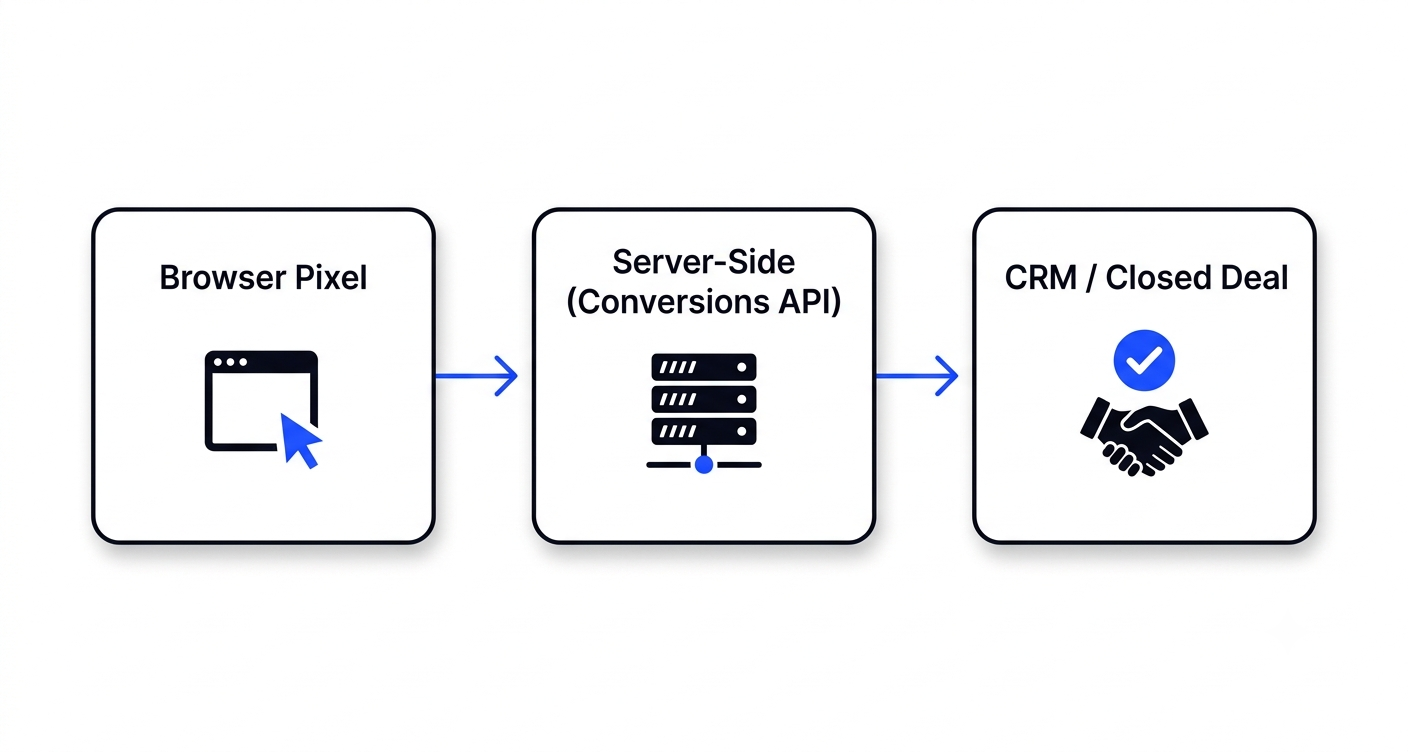
A working conversion tracking setup in 2026 has three layers. Most businesses have one, assume it is enough, and are quietly wrong.
| Layer | What it captures | Where it fails |
|---|---|---|
| 1. Browser pixel | Page views, form starts, on-page events | Blocked, declined, expired cookies |
| 2. Server-side (Conversions API) | The same events sent from your server | Cannot see what never reached the server |
| 3. CRM / offline | What actually closed and for how much | Only as good as your team's data entry |
Layer 1: the pixel
Still necessary, still first. It gives the ad platform the fast in-browser signal it uses for optimisation. But treat it as one input rather than the source of truth, because a significant share of events never reach it.
Layer 2: the Conversions API
This is the single highest-return fix available to most advertisers, and it is the one most Indian businesses have not implemented. Instead of relying on the visitor's browser to report a conversion, your server reports it directly to Meta or Google using Meta's Conversions API. Missing server events are also the main reason your retargeting audiences come out smaller than they should.
The important detail is deduplication. If both the pixel and the server report the same conversion, you will double-count unless each event carries a matching event ID that lets the platform recognise them as one. Setups that skip this look like a dramatic improvement for about a week, then produce numbers nobody trusts.
Layer 3: the CRM
Layers one and two tell you a lead happened. Only this layer tells you whether it turned into money. Without it you are optimising for form fills, which is how our client ended up scaling their worst campaigns.
A lead is not a result. Optimising for leads produces more leads. Optimising for closed revenue produces more revenue, and those two campaigns are frequently not the same campaign.
Track money, not activity
Most tracking setups measure things that are easy to measure rather than things that predict revenue. Here is the hierarchy that matters, weakest to strongest.
| Event | What it tells you | Worth optimising to? |
|---|---|---|
| Page view | The ad delivered a click | No |
| Time on page / scroll | The page held attention | Diagnostic only |
| Form start | Some intent existed | Rarely |
| Form submit / lead | Contact details captured | Only at low volume |
| Qualified lead | Met your criteria | Yes |
| Call booked and attended | Real sales conversation | Yes |
| Closed deal + value | Actual revenue | Best |
The practical constraint is volume. Ad platforms need roughly fifty conversions per week per ad set to optimise reliably. If you close eight deals a month, you cannot optimise to closed deals — there is not enough signal. In that case optimise to the strongest event you can generate at volume, usually qualified lead or booked call, and use closed-deal data for your own decisions rather than the algorithm's. To judge whether a lead is cheap or expensive in the first place, start with what a lead actually costs on Meta in India.
Optimise the campaign to the deepest event that occurs at least fifty times a week. Report on the deepest event that occurs at all. Those are two different numbers and confusing them is why so many dashboards look healthy while revenue does not move.
UTM discipline
UTMs are unglamorous and they are the reason attribution works at all when everything else fails. If a lead arrives with its source recorded in your CRM, you can trace it manually even when every pixel has failed.
What we enforce on every account:
- A single naming convention, written down. Lowercase, no spaces, hyphens not underscores, and the same words every time.
utm_source=facebookandutm_source=Facebookbecome two rows in every report you ever run. - Dynamic parameters for campaign detail. Meta can pass the campaign, ad set and ad name automatically. Hand-typing these guarantees they will drift within a month.
- Capture UTMs into hidden form fields. This is the step almost everyone skips. If the UTM values are written into hidden fields on your form and stored with the lead, your CRM knows the source of every enquiry permanently — no cookie required.
- Persist them across pages. If someone lands on your page, clicks through to another page and converts there, the UTM must survive the journey. Without that, internal navigation erases the source.
That third point is worth the whole setup. Hidden-field capture is the layer that keeps working when consent is declined, cookies expire and the platform reporting disagrees with itself.
Not sure what your setup is actually capturing?
We audit tracking as part of every campaign we take on — pixel, server events, UTM capture and CRM handoff. You get a written picture of what is broken before anything is rebuilt.
Get a tracking audit →Closing the loop offline
For most Indian service businesses the sale does not happen on the website. It happens on a phone call, on WhatsApp, or in a clinic. That means the most important conversion event occurs somewhere your pixel cannot see.
The fix is offline conversion upload. Both Meta and Google accept a file of closed deals matched back to the original click — see Google's own documentation on offline conversion import for the exact format. The mechanics:
- Capture a click identifier at the start. Meta passes an
fbclidparameter; Google passesgclid. Store these in hidden form fields alongside the UTMs, exactly as above. - Keep them attached to the record. As the lead moves through your CRM, that identifier travels with it.
- Upload when the deal closes. Export closed deals with their identifiers and values, and upload to the platform — weekly is enough for most businesses.
- Let it inform optimisation. Once enough closed deals are flowing back, the platform can optimise toward the people who actually buy rather than the people who fill in forms.
This is the step that separates businesses that scale profitably from businesses that scale their lead volume. It takes a fortnight to set up and it is the closest thing to a genuine edge available in paid media right now, precisely because so few advertisers bother.
Mistakes we find constantly
- The pixel fires on page load, not on conversion. Every visitor counts as a lead. The reported CPL is fiction and the algorithm is optimising toward nothing.
- Two pixels on one page. Usually a leftover from a previous agency. Every event doubles.
- Thank-you page reachable directly. If someone can land on it without converting — or a bot can crawl it — your conversion count inflates quietly.
- CAPI without deduplication. Discussed above. Looks like a win, produces numbers nobody can defend.
- No test purchase or test lead after launch. Submit your own form after every change and confirm the event lands. This takes four minutes and catches most failures on day one instead of month three.
- Comparing platform numbers to analytics and panicking. Meta, Google Analytics and your CRM use different attribution windows and models, so they will never agree. Pick one as your commercial source of truth — ideally the CRM — and use the others for direction.
Common questions
How much does a proper conversion tracking setup cost?
For most small and mid-sized businesses this is a one-off setup measured in days of work rather than an ongoing cost. The tools themselves — pixel, Conversions API, Google Tag Manager, offline uploads — are free. What you are paying for is the configuration and the testing. Against a ₹3 lakh monthly ad budget it is trivially worth it; against a ₹15,000 budget, keep it simple and focus on UTM capture in hidden fields.
Do I need Google Tag Manager?
Not strictly, but it makes everything after the first change far easier. Without it, every tracking adjustment is a developer request. With it, you manage events yourself. If you plan to run ads for more than a few months, install it early.
My Meta reporting and Google Analytics disagree. Which is right?
Neither, exactly. They use different attribution models and windows — Meta credits clicks and views within its own window, Analytics usually credits the last non-direct source. The disagreement is expected. Use your CRM as the commercial source of truth and treat the platforms as steering instruments.
Is this worth doing if I only spend ₹20,000 a month?
The full three-layer setup, probably not yet. But do the cheap parts: consistent UTMs, hidden-field capture on your form, and a CRM field recording where each lead came from. That costs almost nothing and gives you the one thing that matters — the ability to trace a closed deal back to a source when you decide to scale. At that budget it is also worth picking one platform first; our Google ads vs Meta ads guide helps you choose.
How long before the data is trustworthy?
Give it a full sales cycle plus a few weeks. If your average deal takes three weeks to close, you need at least six to eight weeks before the closed-deal picture means anything. Judging attribution after ten days will mislead you, because the deals in flight have not landed yet.
Rohit Bhatt
Founder, LFC VenturesRohit runs Meta and Google campaigns alongside the pages they point at, and audits tracking on every account his team takes over. The conversion tracking setup described here is the one used across LFC client accounts.